Flask 基础 第一个应用 1 2 3 4 5 6 7 8 from flask import Flaskapp=Flask(__name__) @app.route('/' def index (): return "hello world" if __name__ == '__main__' : app.run()
调试 1 2 3 4 5 6 7 8 from flask import Flaskapp=Flask(__name__) @app.route('/' def index (): return "hello world" if __name__ == '__main__' : app.run
路由 程序需要每个 URL 运行哪些代码,所以保存一个 URL 到 Python 函数的映射关系。处理 URL 和函数之间关系的程序称为路由。
1 2 3 4 5 6 7 8 9 10 from flask import Flaskapp=Flask(__name__) @app.route('/404' def index (): return """<html><head><title>404 Not Found</title></head> <body><center><h1>404 Not Found</h1></center> <hr><center>nginx</center></body></html>""" if __name__ == '__main__' : app.run(debug=True ,port=8088 )
变量规则 在@app.route()函数中添加 URL 时,该 URL 有时候是变化的,所以针对这种情况,可以构造有动态部分的 URL,也可以在一个函数上添加多个规则。
在给 URL 添加变量部分时,可以把这些特殊的字段标记为<变量名>的形式,它将作为命名参数传递给函数。要给变量名的类型进行限制,可以用<变量类型:变量名>指定一个可选的类型转换器
1 2 3 4 5 6 7 8 9 10 11 12 13 14 from flask import Flaskapp=Flask(__name__) @app.route('/' def index (): return 'hello world' @app.route('/user/<username>' def show_user_profile (username ): return f'用户名是:{username} ' @app.route('/post/<int:post_id>' def show_post (post_id ): return f'ID是{post_id} ' if __name__ == '__main__' : app.run(debug= True )
构造 URL 使用 url_for () 函数来给指定的函数构造 URL。其第一个参数是函数名,其余参数会添加到 URL 末尾作为查询参数
1 2 3 4 5 6 7 8 9 10 11 12 13 14 from flask import *app=Flask(__name__) @app.route('/' def index (): return redirect(url_for('show_user_profile' ,username='bill' )) @app.route('/user/<username>' def show_user_profile (username ): return f'用户名是:{username} ' @app.route('/post/<int:post_id>' def show_post (post_id ): return f'ID是{post_id} ' if __name__ == '__main__' : app.run(debug= True )
HTTP 方法 1 2 3 4 5 6 7 8 9 10 11 12 13 14 15 16 17 from flask import *app=Flask(__name__) @app.route('/' ,methods=['GET' ,'POST' ] def index (): if request.method=='POST' : return redirect(url_for('show_user_profile' ,username='bill' )) else : return "Hello" @app.route('/user/<username>' def show_user_profile (username ): return f'用户名是:{username} ' @app.route('/post/<int:post_id>' def show_post (post_id ): return f'ID是{post_id} ' if __name__ == '__main__' : app.run(debug= True )
模板 模板是一个包含响应文本的文件,其中包含占位变量的动态部分,其具体值只在请求的上下文才知道。
渲染模板 语法格式
1 render_template('temprender.html' ,username=name)
Flask 程序默认在 templates 子文件中找模板
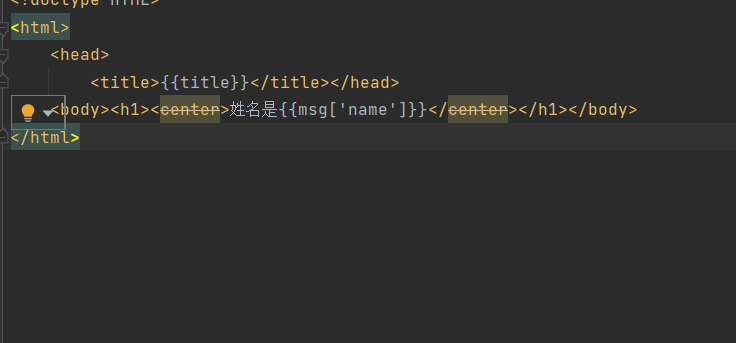
1 2 3 4 5 6 7 8 9 10 from flask import Flask,url_for,render_templateapp=Flask(__name__) @app.route('/' def index (): title="Flask" msg="你好" return render_template('index.html' ,title=title,msg=msg) if __name__ == '__main__' : app.run()
模板变量 {{name}}表示一个变量,是一种特殊的占位符。也可以是列表、字典和对象
还有常用过滤器
1 2 3 4 5 6 <!doctype HTML > <html > <head > <title > {{title}}</title > </head > <body > <h1 > <center > {{msg|upper}}</center > </h1 > </body > </html >
名称
说明
safe
渲染时不转义
capitalize
把值得首字母转为大写,其它字母转为小写
lower
把值转为小写
upper
把值转换为大写形式
title
把值中每个单词的首单词都转换为大写
trim
把值的首尾空格去掉
striptages
渲染之前把值中所有的 HTML 标签都删掉
控制结构 1 2 3 4 5 6 7 8 9 10 11 12 13 14 from flask import Flask, url_for, render_templateapp = Flask(__name__) @app.route('/' def index (): title = "Flask" user="" return render_template('index.html' , title=title,user=user) if __name__ == '__main__' : app.run()
1 2 3 4 5 6 <!doctype HTML > <html > <head > <title > {{title}}</title > </head > <body > <h1 > {% if user %}{{user}}{% else %}no user{% endif %}</h1 > </body > </html >
Web 表单
表单类 使用 Flask-WTF 时候,每个 Web 表单都继承自 Form 的类表示
例如
1 2 3 4 5 6 7 from flask_wtf import FlaskFormfrom wtforms import *from wtforms.validators import DataRequiredclass NameForm (FlaskForm ):\ name=StringField('请输入姓名' ,validators=DataRequired()) passwd=PasswordField('请输入密码' ,validators=DataRequired()) sumbmit=SubmitField("提交" )
当然 WTForms 支持其它 HTML 标准字段
字段类型
说明
StringField
文本字段
TextAreaField
多行文本字段
PasswordFiled
密码文本字段
HiddenField
隐藏文本字段
DateField
文本字段,值为 datetime.date 格式
DateTimeField
文本字段,值为 datetime.datetime 格式
IntegerField
文本字段,值为整数
DecimalField
文本字段,值为 decimal.Decimal 格式
FloatField
文本字段,值为浮点数
BooleanField
复选框,值为 True 或 False
RadioField
一组单选按钮
SelectFiled
下拉列表
SelectMultipleField
下拉列表,可选择多个值
FileField
文件上传字段
SubmitFiled
表单提交按钮
FormFiled
把表单作为字段嵌入另一个表单内
FieldList
一组指定类型的字段
WTForms 内置的验证函数
字段类型
说明
Email
验证电子邮箱地址
EqualTo
比较两个字段的值,常用于比较输入两次密码进行确认的情况
IPAdress
验证 IPv4 地址
Length
验证输入字符串的长度
NumberRange
验证输入的值的在数字范围内
Optional
无输入值时跳过其他验证函数
Required
确保字段中有数据
Regexp
使用正则表达式验证输入值
URL
验证 URL
AnyOf
确保输入值在可选列表中
把表单渲染成 HTML models.py
1 2 3 4 5 6 7 8 9 10 11 from flask_wtf import FlaskFormfrom wtforms import *from wtforms.validators import DataRequired, Lengthclass LoginForm (FlaskForm ): name = StringField(label='用户名' , validators=[DataRequired("用户名不能为空" ), Length(max =10 , min =3 , message="用户名要大于3且小于10" )]) password = PasswordField(label='密码' , validators=[DataRequired("密码不能为空" ), Length(max =15 , min =6 , message="密码长度大于6且小于15" )]) submit = SubmitField(label="提交" )
main.py
1 2 3 4 5 6 7 8 9 10 11 12 13 14 15 16 17 18 19 20 21 22 23 24 25 from flask import *from models import LoginFormapp = Flask(__name__) app.config['SECRET_KEY' ] ="HELLO" @app.route('/login' , methods=['GET' , 'POST' ] def login (): form = LoginForm() if form.validate_on_submit(): username = form.name.data password = form.password.data if username == "bill" and password =="myfile12" : return redirect(url_for('index' )) return render_template("login.html" ,form=form) @app.route('/' def index (): return render_template("index.html" , title="首页" , user="用户" ) if __name__ == '__main__' : app.run(debug=True )
1 2 3 4 5 6 7 8 9 10 11 12 13 14 15 16 17 18 19 20 21 22 23 <!doctype html > <html > <head > <title > 登录</title > </head > <body > <center > 表单</center > <hr > <form action ="" method ="post" > {{form.name.label}} {{form.name()}} {% for err in form.name.errors %} <p style ="color: red" > {{err}}</p > {% endfor %} {{form.password.label}} {{form.password()}} {% for err in form.password.errors %} <p style ="color: red" > {{err}}</p > {% endfor %} {{form.csrf_token}} {{form.submit()}} </form > </body > </html >