MCP 实战指南

学习链接

mcp

MCP?

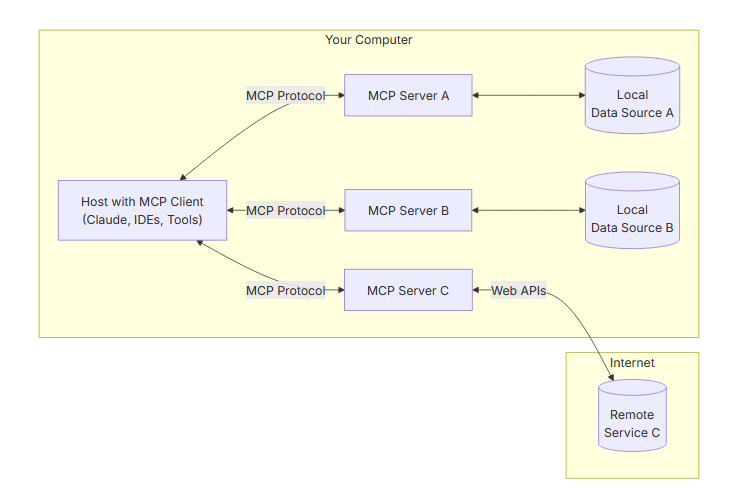
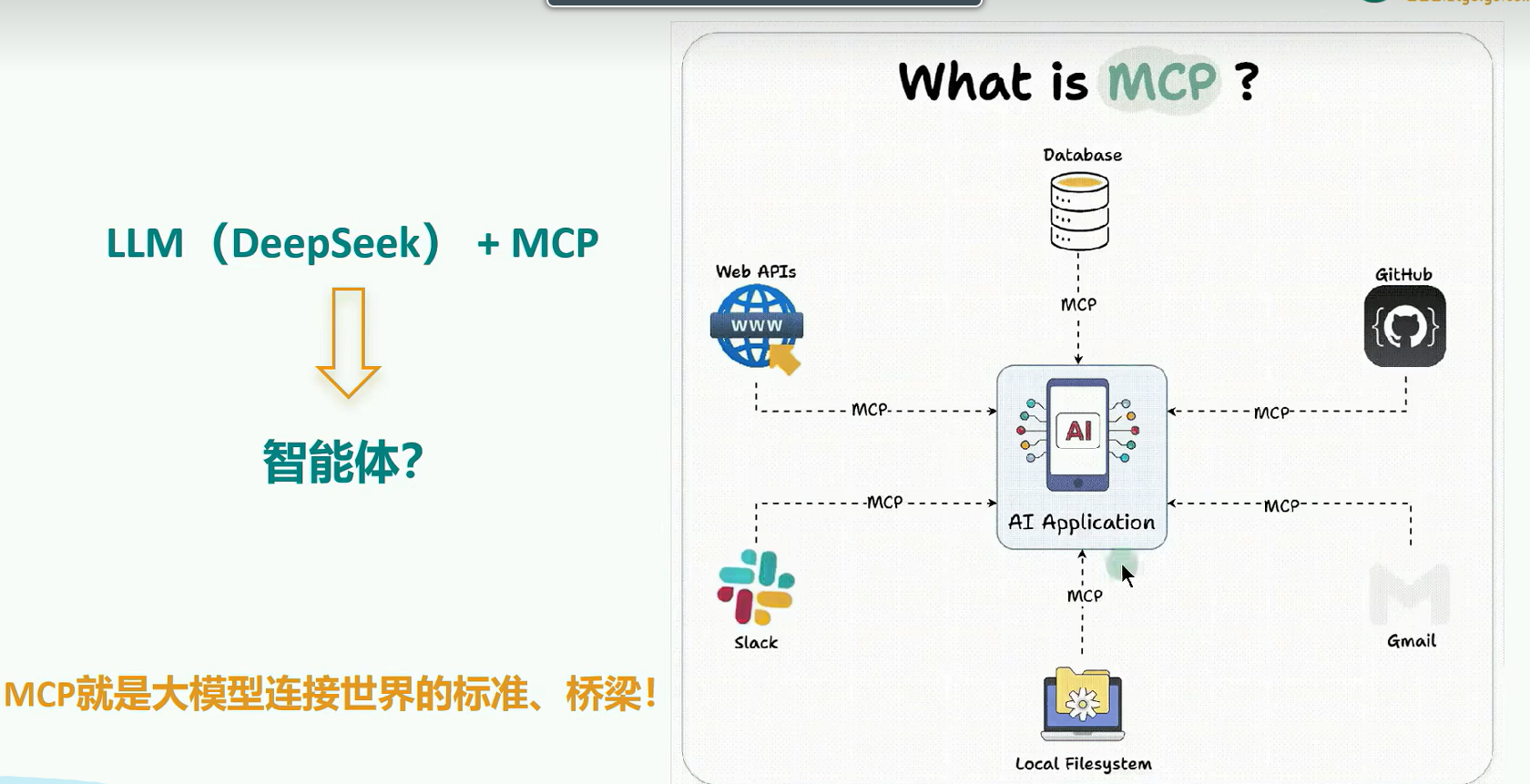
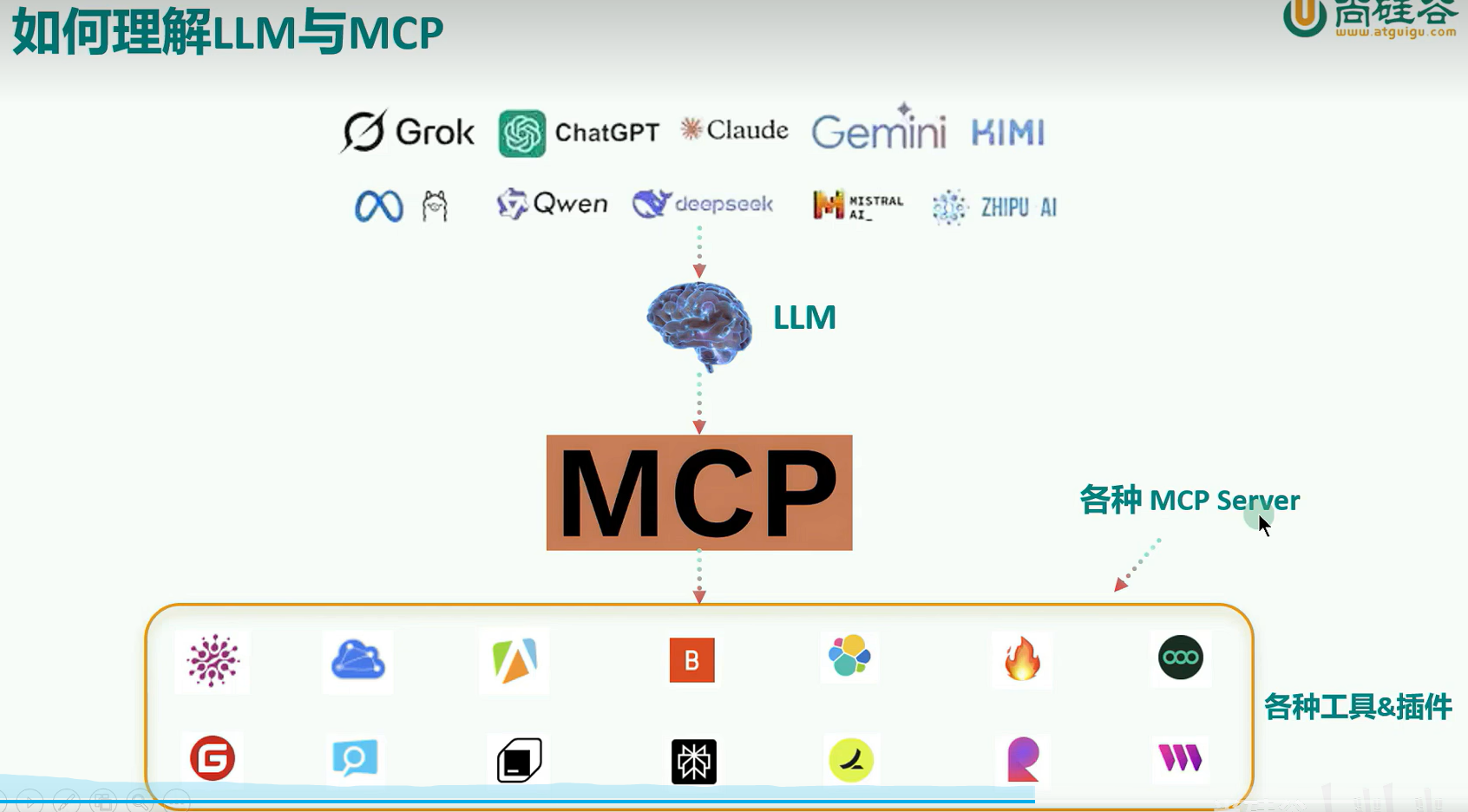
MCP (Model Context Protocol, 模型上下文协议),2024 年 11 月底, 由 Anthropic 推出的一种开放标准。旨在为大语言模型 (LLM) 提供统一的、标准化方式与外部数据源和工具之间进行通信。
MCP 资源

MCP 应用场景

应用领域 典型场景 MCP 价值 代表实现
智能编程助 手 代码生成、Bug 修复、 API 集成 安全访问本地代码库、 CI / CD 系统 VS Code 插件 Cursor.
数据分析工 自然语言查询数据库、 安全查询内部数据库、 XiYanSQL-MCP、数据
具 可视化生成 连接 BI 工具 库 MCP 服务器
企业知识管 知识库查询、文档生 安全访问内部文档、保 文件系统 MCP、Email-
理 成、邮件撰写 护隐私数据 MCP
创意设计工 具 3D 建模、图形生成、U I 设计 与专业软件无缝集成 Blender MCP、浏览器 自动化
工作流自动 化 多系统协调、事件驱动 流程 跨系统安全协作 Cloudflare MCP. AWS 自动化套件

stdio 本地环境安装:UVX

1
pip install uv

MCP 架构与工作原理

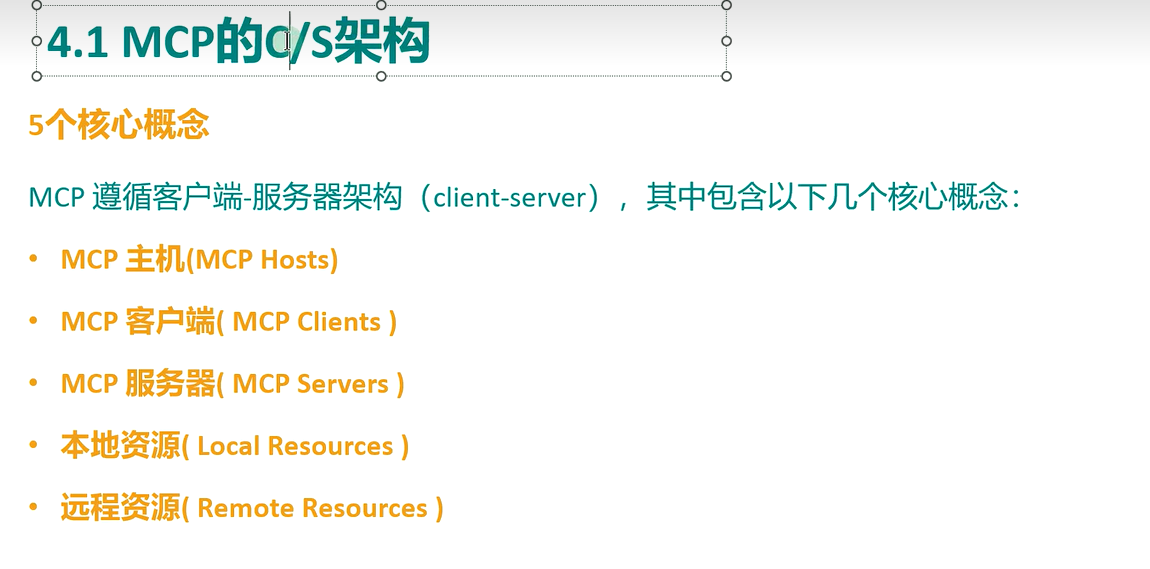
三个角色

1
2
3
4
5
6
7
8
9
10
11
┌─────────────────────────────────────────────────┐
│ Host(宿主应用:Claude Desktop / Cursor / …) │
│ ┌──────────┐ ┌──────────┐ ┌──────────┐ │
│ │ Client 1 │ │ Client 2 │ │ Client 3 │ … │
│ └────┬─────┘ └────┬─────┘ └────┬─────┘ │
└───────┼─────────────┼─────────────┼──────────────┘
│ JSON-RPC 2.0│ │
┌────▼────┐ ┌────▼────┐ ┌────▼────┐
│ Server A│ │ Server B│ │ Server C│
│(文件系统)│ │(数据库) │ │(你的代码)│
└─────────┘ └─────────┘ └─────────┘
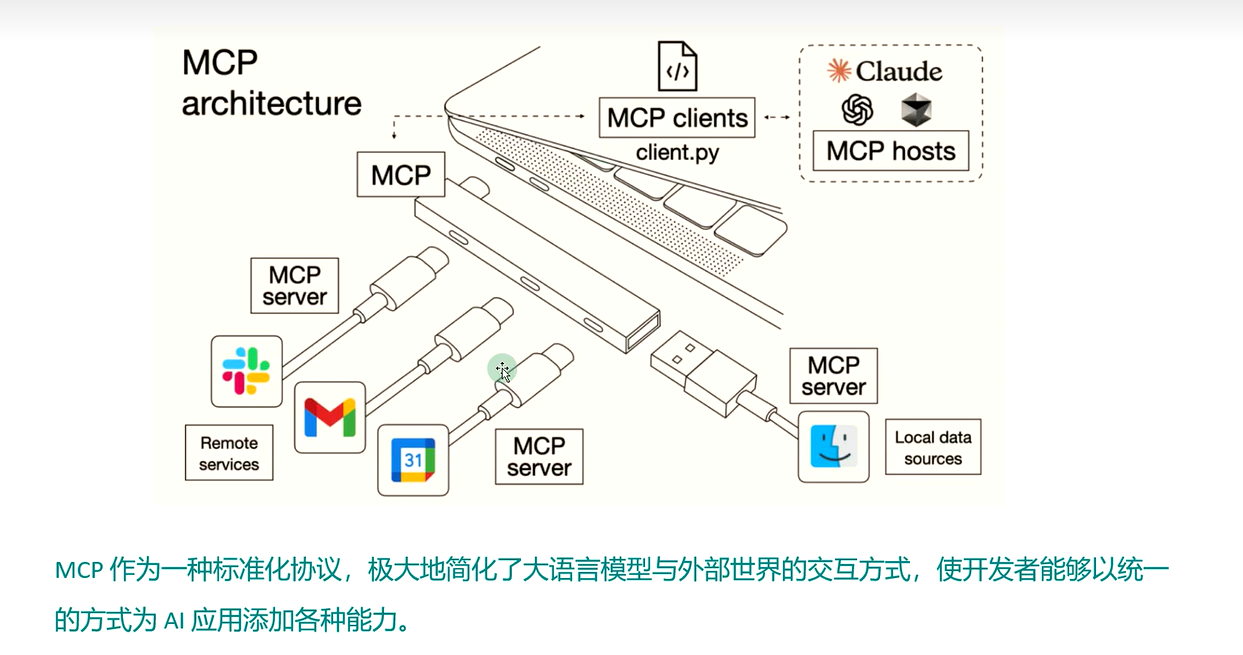
  • Host(宿主):用户直接面对的 AI 应用,负责管理连接、汇总各服务器的能力、把工具交给模型决策。
  • Client(客户端):宿主内部为每个服务器维持的一个连接(1:1 关系)。
  • Server(服务器):你要写的东西 —— 一个轻量进程或服务,暴露 Tools、Resources、Prompts。

通信原理

  • 底层消息格式是 JSON-RPC 2.0(jsonrpc、id、method、params)。
  • 连接建立时有能力协商(capability negotiation):双方交换协议版本和各自支持的能力(服务器声明有 tools/resources/prompts,客户端声明支持 sampling/roots/elicitation 等)。
  • 你几乎不需要手写 JSON - RPC——SDK 帮你封装好了,写服务器就是写几个带装饰器的普通函数。

为什么是 MCP 而不是直接调 API

写传统 REST API,模型不知道怎么调用它;而 MCP 服务器会主动向客户端描述自己:「我有这些工具、参数 schema 是什么、这些是只读资源、这些是提示词模板」。宿主把这些描述注入模型上下文,模型就能自动发现并正确使用你的能力。

核心概念:Tools / Resources / Prompts 与客户端能力

服务器暴露的三种原语(Primitives)

原语 谁控制 类比 典型用途
Tools(工具) 模型决定何时调用 函数 / POST 接口 查询天气、写数据库、发邮件、执行计算
Resources(资源) 客户端 / 用户选择读取 GET 接口 / 文件 配置文件、文档、数据库 schema、日志
Prompts(提示词) 用户主动触发 参数化模板 「代码审查」「周报生成」等固定工作流

经验法则:要” 做事” 用 Tool,要” 读数据” 用 Resource,要” 复用话术” 用 Prompt。

客户端提供给服务器的能力(反向调用)

服务器也可以反过来请求客户端:

  • Sampling(采样):服务器让客户端帮忙调一次 LLM(例如工具内部需要模型总结)。
  • Roots(根目录):客户端告诉服务器「你可以关注这些目录 / URI 边界」。
  • Elicitation(征求输入):工具执行中途向用户要结构化输入(例如「请选择删除范围」)。

⚠️ 版本注意:FastMCP 4 中 ctx.sample() 与 ctx.list_roots() 已移除(协议演进为新的多轮交互机制),因此本教程的 Context 例程聚焦在所有版本都稳定的日志、进度报告、资源读取上;Elicitation 在第 7 章以版本注释方式说明。


传输层:stdio 与 Streamable HTTP

stdio Streamable HTTP
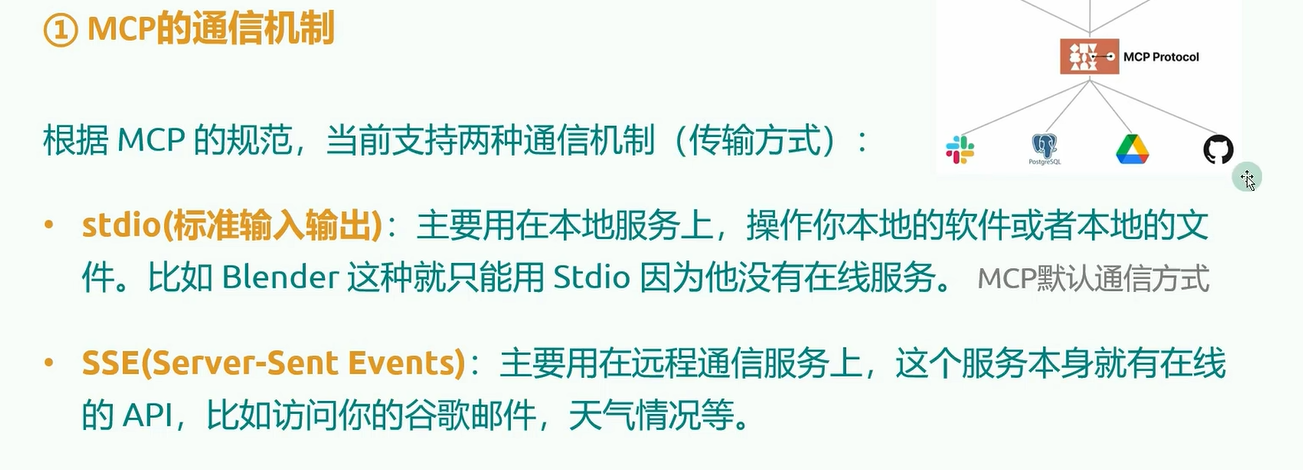
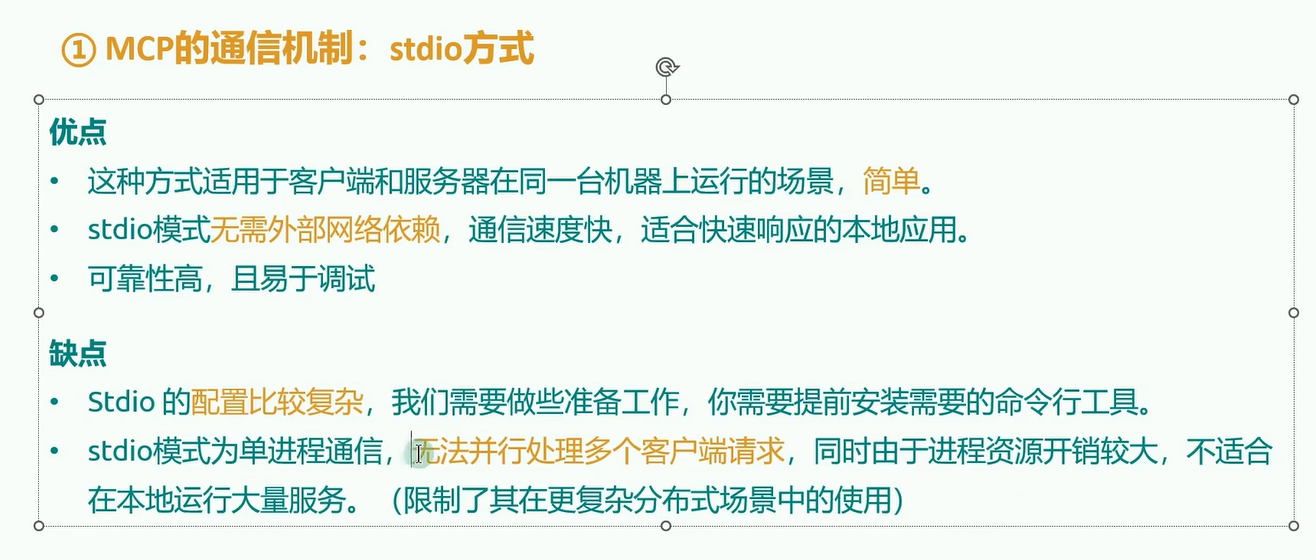
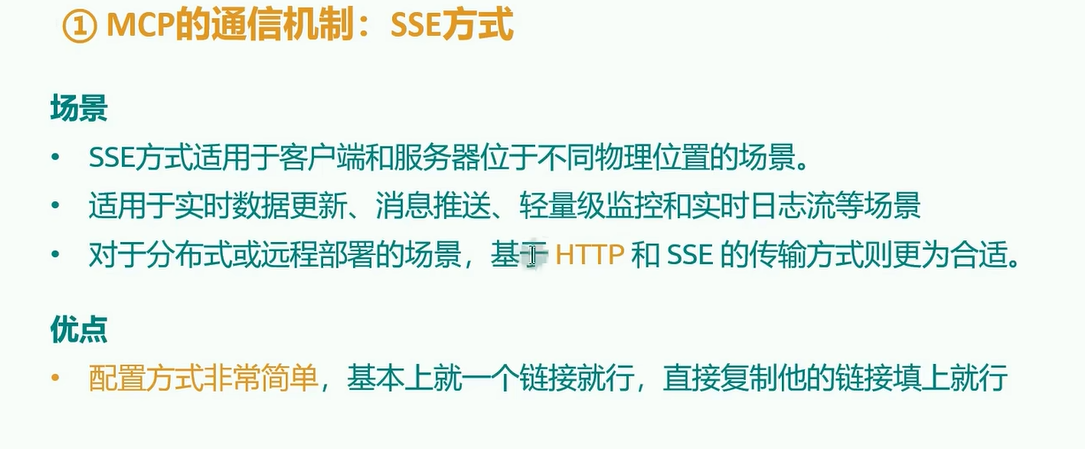
工作方式 客户端把你的服务器拉起来当子进程,走标准输入 / 输出 服务器作为 HTTP 服务常驻,端点默认 /mcp
适用场景 本地桌面集成(Claude Desktop、Cursor、Claude Code) 团队共享、远程、容器化、生产部署
认证 不需要(继承本机用户权限) 需要:Bearer Token / OAuth 2.1
Python 启动 mcp.run() mcp.run(transport="http", host=..., port=...)

要点:

  • 旧的 HTTP + SSE 传输已废弃(2025-03-26 起),新项目一律用 Streamable HTTP。SSE 只作为其内部的流式机制存在。
  • stdio 服务器绝对不能往 stdout 打印任何业务日志 ——stdout 是协议通道,打印日志会污染 JSON - RPC 报文导致连接断开。日志请写 stderr 或用 ctx.info()(见例程三)。
  • 2026-07-28 修订版把 HTTP 传输改为默认无状态(不再有强制会话握手),并要求服务器校验 Origin 头、本地运行时绑定 127.0.0.1。

第一个 MCP Server

1
2
3
4
5
6
7
8
9
10
11
12
13
14
15
16
17
18
19
20
21
22
23
24
25
26
27
28
29
30
31
32
from fastmcp import FastMCP

# 创建服务器实例,名字会显示给客户端
mcp = FastMCP("我的第一个服务器")


@mcp.tool()
def add(a: float, b: float) -> float:
"""把两个数字相加。

文档字符串会成为工具描述,类型标注会成为参数 schema——
模型靠它们来决定何时、如何调用这个工具,务必认真写。
"""
return a + b


@mcp.tool()
def greet(name: str, formal: bool = False) -> str:
"""向某人打招呼。

Args:
name: 对方的名字
formal: 是否使用正式语气
"""
if formal:
return f"您好,{name},很高兴为您服务。"
return f"嗨,{name}!"


if __name__ == "__main__":
# stdio 传输:客户端会把本脚本作为子进程拉起
mcp.run()

Tools 进阶

1
2
3
4
5
6
7
8
9
10
11
12
13
14
15
16
17
18
19
20
21
22
23
24
25
26
27
28
29
30
31
32
33
34
35
36
37
38
39
40
41
42
43
44
45
46
47
48
49
50
51
52
53
54
55
56
57
58
59
60
61
62
63
64
65
66
67
68
69
70
71
72
73
74
75
76
77
78
79
80
81
82
83
import asyncio
import random
from typing import Annotated

from pydantic import BaseModel, Field
from fastmcp import FastMCP
from fastmcp.exceptions import ToolError

mcp = FastMCP("进阶工具示例")


# ---------- 1. 参数校验:用 Annotated + Field 写清约束 ----------

@mcp.tool()
def divide(
a: float,
b: Annotated[float, Field(description="除数,不能为 0")],
precision: Annotated[int, Field(ge=0, le=10, description="保留小数位数")] = 2,
) -> float:
"""计算 a 除以 b 的结果。"""
if b == 0:
# 抛 ToolError:错误信息会以 isError=true 的形式返回给模型,
# 模型能看到原因并自行修正参数重试。
raise ToolError("除数不能为 0")
return round(a / b, precision)


# ---------- 2. 结构化输出:返回 dict / Pydantic 模型 ----------

class WeatherReport(BaseModel):
city: str
temperature_c: float
condition: str
humidity_pct: int


@mcp.tool()
def get_weather(city: str) -> WeatherReport:
"""获取指定城市的当前天气(演示用假数据)。

返回 Pydantic 模型时,FastMCP 会同时生成:
- structuredContent:结构化 JSON,供程序消费
- content:文本摘要,供模型阅读
"""
# 真实项目里这里应该调天气 API,例如 httpx.get(...)
return WeatherReport(
city=city,
temperature_c=round(random.uniform(-5, 35), 1),
condition=random.choice(["晴", "多云", "小雨", "雷阵雨"]),
humidity_pct=random.randint(20, 95),
)


# ---------- 3. 异步工具:IO 密集操作务必用 async ----------

@mcp.tool()
async def fetch_url_title(url: str) -> str:
"""抓取网页标题(演示异步写法,用 asyncio.sleep 模拟网络请求)。"""
if not url.startswith(("http://", "https://")):
raise ToolError(f"非法 URL:{url}")
await asyncio.sleep(0.5) # 真实场景:resp = await httpx.AsyncClient().get(url)
return f"《{url} 的标题》"


# ---------- 4. 工具注解(annotations):告诉模型工具的副作用 ----------

@mcp.tool(annotations={"readOnlyHint": True, "openWorldHint": False})
def get_server_time() -> str:
"""返回服务器当前时间。只读工具,模型可以更放心地自动调用。"""
from datetime import datetime
return datetime.now().isoformat(timespec="seconds")


@mcp.tool(annotations={"destructiveHint": True})
def delete_all_data(confirm: bool = False) -> str:
"""清空全部数据(演示用)。destructiveHint 会提示客户端先让用户确认。"""
if not confirm:
raise ToolError("危险操作:请将 confirm 设为 true 以确认删除")
return "(演示)所有数据已删除"


if __name__ == "__main__":
mcp.run()

要点小结:

  1. 让模型看得懂错误:业务错误抛 ToolError(模型可见、可重试); unexpected 的程序异常会被 SDK 兜底为 isError 结果。
  2. 优先结构化输出:返回 dict / dataclass / Pydantic 模型,客户端同时拿到文本和 JSON。
  3. annotations 很重要:readOnlyHint / destructiveHint / idempotentHint / openWorldHint 会影响宿主「是否自动放行还是弹确认」的决策。
  4. 工具描述写给模型看:描述里说清「什么时候该用、什么时候不该用」,比参数名更能提升调用准确率

Context—— 日志、进度报告与服务器内互调

在工具函数签名里声明一个 ctx: Context 参数,FastMCP 会自动注入上下文对象(它不会出现在工具 schema 里)。

1
2
3
4
5
6
7
8
9
10
11
12
13
14
15
16
17
18
19
20
21
22
23
24
25
26
27
28
29
30
31
32
33
34
35
36
37
38
39
40
41
42
43
44
45
46
47
48
49
50
51
52
53
54
55
"""例程三:Context 上下文 —— 日志、进度报告、读取自身资源。"""
import asyncio

from fastmcp import FastMCP, Context

mcp = FastMCP("上下文示例")


# 先注册一个资源,供下面的工具演示 ctx.read_resource()
@mcp.resource("config://settings")
def get_settings() -> str:
return '{"max_retry": 3, "timeout_s": 30}'


@mcp.tool()
async def process_files(file_count: int, ctx: Context) -> str:
"""模拟批量处理文件:演示进度报告 + 日志推送到客户端。

Args:
file_count: 要处理的文件数量(1-20)
"""
file_count = max(1, min(file_count, 20))

# 1) 日志:推送到客户端显示(不会污染 stdio 协议通道)
await ctx.info(f"开始处理 {file_count} 个文件")
await ctx.debug("这是一条调试日志,客户端可选择性显示")

# 2) 读配置资源:服务器内部也能消费自己注册的资源
settings = await ctx.read_resource("config://settings")
await ctx.debug(f"已加载配置:{settings.text}")

for i in range(file_count):
await asyncio.sleep(0.2) # 模拟处理
# 3) 进度报告:客户端需带 progressToken 才会收到
await ctx.report_progress(progress=i + 1, total=file_count)
if i == file_count // 2:
await ctx.warning("已处理过半,一切正常")

await ctx.info("全部处理完成")
return f"成功处理 {file_count} 个文件"


# Elicitation(执行中向用户要输入)—— FastMCP 2/3 的写法如下:
#
# @mcp.tool()
# async def delete_project(project_id: str, ctx: Context) -> str:
# ok = await ctx.elicit(f"确认删除项目 {project_id}?", response_type=bool)
# ...
#
# ⚠️ FastMCP 4 已将交互式输入重构为协议级「多轮交互」机制
# (InputRequiredResult / SEP-2322),写法有变化,请以你所用版本的
# 官方文档为准:https://gofastmcp.com/servers/context

if __name__ == "__main__":
mcp.run()

Context 还能做什么(按版本稳定性排序):

能力 方法 说明
日志 ctx.debug/info/warning/error() 全版本稳定
进度 ctx.report_progress(progress, total) 全版本稳定
读资源 / 提示词 ctx.read_resource()、ctx.get_prompt() 服务器内互调
HTTP 请求信息 ctx.request_context 仅 HTTP 传输下有值
征求用户输入 ctx.elicit()(v2/v3) v4 已重构,见文中注释

Resources(静态资源与 URI 模板)

资源是只读数据,用 URI 标识。URI 模板(RFC 6570)可以把参数带进 URI,比如 user://{user_id}/profile。

1
2
3
4
5
6
7
8
9
10
11
12
13
14
15
16
17
18
19
20
21
22
23
24
25
26
27
28
29
30
31
32
33
34
35
36
37
38
39
40
41
42
43
44
45
46
47
48
49
50
51
52
import json
from pathlib import Path

from fastmcp import FastMCP

mcp = FastMCP("资源示例")

# 模拟的用户数据库
USERS = {
"u001": {"name": "张三", "role": "admin", "email": "zhangsan@example.com"},
"u002": {"name": "李四", "role": "developer", "email": "lisi@example.com"},
}


# ---------- 1. 静态资源:固定 URI ----------

@mcp.resource("app://version")
def app_version() -> str:
"""应用版本信息。"""
return "mcp-tutorial v1.0.0"


@mcp.resource("data://users/list", mime_type="application/json")
def list_users() -> str:
"""全部用户列表(JSON)。"""
return json.dumps(list(USERS.keys()), ensure_ascii=False)


# ---------- 2. 资源模板:URI 里的 {参数} 会变成函数参数 ----------

@mcp.resource("user://{user_id}/profile", mime_type="application/json")
def get_user_profile(user_id: str) -> str:
"""按用户 ID 读取用户资料。"""
user = USERS.get(user_id)
if user is None:
raise ValueError(f"用户不存在:{user_id}")
return json.dumps({"id": user_id, **user}, ensure_ascii=False)


@mcp.resource("file://{path}")
def read_text_file(path: str) -> str:
"""读取项目目录下的文本文件(注意防路径穿越)。"""
base = Path(__file__).parent.resolve()
target = (base / path).resolve()
# 安全:拒绝逃出基准目录的路径(FastMCP 4 默认也会拒绝 "..")
if not str(target).startswith(str(base)):
raise ValueError("非法路径")
return target.read_text(encoding="utf-8")


if __name__ == "__main__":
mcp.run()

Prompts(可复用提示词模板)

Prompt 是带参数的提示词模板,用户在客户端里通过「斜杠命令」之类的入口主动触发。

1
2
3
4
5
6
7
8
9
10
11
12
13
14
15
16
17
18
19
20
21
22
23
24
25
26
27
28
29
30
31
32
33
34
35
36
37
38
39
from fastmcp import FastMCP
from fastmcp.prompts import Message

mcp = FastMCP("提示词示例")


# ---------- 1. 返回字符串:最简单,自动作为一条 user 消息 ----------

@mcp.prompt()
def code_review(code: str, language: str = "python") -> str:
"""生成一段代码审查请求的提示词。"""
return (
f"请审查以下 {language} 代码,重点关注:\n"
f"1. 正确性与边界条件\n2. 性能问题\n3. 可读性与命名\n4. 安全隐患\n\n"
f"```{language}\n{code}\n```"
)


# ---------- 2. 返回消息列表:构造多轮对话上下文 ----------

@mcp.prompt()
def debug_helper(error_message: str) -> list:
"""构造「资深工程师帮你排错」的多轮提示词。"""
return [
Message(
role="user",
content="你是一位资深工程师。我先描述问题,你再帮我分析。",
),
Message(role="assistant", content="好的,请把错误信息和相关上下文发给我。"),
Message(
role="user",
content=f"我遇到了这个错误:\n\n{error_message}\n\n"
"请分析可能的原因,并按可能性从高到低给出排查步骤。",
),
]


if __name__ == "__main__":
mcp.run()

SQLite 笔记服务器

1
2
3
4
5
6
7
8
9
10
11
12
13
14
15
16
17
18
19
20
21
22
23
24
25
26
27
28
29
30
31
32
33
34
35
36
37
38
39
40
41
42
43
44
45
46
47
48
49
50
51
52
53
54
55
56
57
58
59
60
61
62
63
64
65
66
67
68
69
70
71
72
73
74
75
76
77
78
79
80
81
82
83
84
85
86
87
88
89
90
91
92
93
94
95
96
97
98
99
100
101
102
103
104
105
106
107
108
109
110
111
112
113
114
115
116
117
118
119
120
121
122
123
124
125
126
127
128
129
130
131
132
133
134
135
136
137
138
"""
功能:
- 工具:新建笔记 / 搜索笔记 / 删除笔记 / 统计
- 资源:note://{id} 读取单条笔记;notes://all 全部笔记
- 提示词:summarize_notes 让模型总结笔记内容
存储:同目录下的 notes.db(SQLite,标准库自带,零依赖)
"""
import sqlite3
from datetime import datetime
from pathlib import Path

from fastmcp import FastMCP, Context
from fastmcp.exceptions import ToolError

DB_PATH = Path(__file__).parent / "notes.db"
mcp = FastMCP("我的笔记本")


# ---------- 存储层 ----------

def get_conn() -> sqlite3.Connection:
conn = sqlite3.connect(DB_PATH)
conn.row_factory = sqlite3.Row
conn.execute(
"""CREATE TABLE IF NOT EXISTS notes (
id INTEGER PRIMARY KEY AUTOINCREMENT,
title TEXT NOT NULL,
content TEXT NOT NULL,
created_at TEXT NOT NULL
)"""
)
return conn


def row_to_dict(row: sqlite3.Row) -> dict:
return {"id": row["id"], "title": row["title"],
"content": row["content"], "created_at": row["created_at"]}


# ---------- Tools ----------

@mcp.tool()
async def create_note(title: str, content: str, ctx: Context) -> dict:
"""新建一条笔记。

Args:
title: 笔记标题
content: 笔记正文
"""
if not title.strip():
raise ToolError("标题不能为空")
with get_conn() as conn:
cur = conn.execute(
"INSERT INTO notes (title, content, created_at) VALUES (?, ?, ?)",
(title.strip(), content, datetime.now().isoformat(timespec="seconds")),
)
note_id = cur.lastrowid
await ctx.info(f"笔记已创建,id={note_id}")
return {"id": note_id, "message": f"笔记《{title}》已保存"}


@mcp.tool(annotations={"readOnlyHint": True})
def search_notes(keyword: str = "") -> list[dict]:
"""搜索笔记。keyword 为空时返回全部笔记(按时间倒序)。

Args:
keyword: 在标题和正文中搜索的关键词
"""
with get_conn() as conn:
if keyword:
rows = conn.execute(
"SELECT * FROM notes WHERE title LIKE ? OR content LIKE ? "
"ORDER BY id DESC",
(f"%{keyword}%", f"%{keyword}%"),
).fetchall()
else:
rows = conn.execute("SELECT * FROM notes ORDER BY id DESC").fetchall()
return [row_to_dict(r) for r in rows]


@mcp.tool(annotations={"destructiveHint": True})
def delete_note(note_id: int) -> str:
"""按 ID 删除一条笔记。"""
with get_conn() as conn:
cur = conn.execute("DELETE FROM notes WHERE id = ?", (note_id,))
if cur.rowcount == 0:
raise ToolError(f"笔记不存在:id={note_id}")
return f"笔记 {note_id} 已删除"


@mcp.tool(annotations={"readOnlyHint": True})
def notes_stats() -> dict:
"""返回笔记总数和最新一条的标题。"""
with get_conn() as conn:
total = conn.execute("SELECT COUNT(*) FROM notes").fetchone()[0]
latest = conn.execute(
"SELECT title FROM notes ORDER BY id DESC LIMIT 1"
).fetchone()
return {"total": total, "latest_title": latest[0] if latest else None}


# ---------- Resources ----------

@mcp.resource("notes://all", mime_type="application/json")
def all_notes_resource() -> str:
"""全部笔记(JSON 数组)。"""
import json
with get_conn() as conn:
rows = conn.execute("SELECT * FROM notes ORDER BY id DESC").fetchall()
return json.dumps([row_to_dict(r) for r in rows], ensure_ascii=False, indent=2)


@mcp.resource("note://{note_id}", mime_type="text/markdown")
def note_resource(note_id: str) -> str:
"""按 ID 读取单条笔记,渲染为 Markdown。"""
with get_conn() as conn:
row = conn.execute("SELECT * FROM notes WHERE id = ?",
(int(note_id),)).fetchone()
if row is None:
raise ValueError(f"笔记不存在:id={note_id}")
return f"# {row['title']}\n\n> 创建时间:{row['created_at']}\n\n{row['content']}"


# ---------- Prompts ----------

@mcp.prompt()
def summarize_notes() -> str:
"""让模型读取全部笔记并生成摘要。"""
return (
"请通过 notes://all 资源读取我的全部笔记,然后:\n"
"1. 按主题归类;\n"
"2. 每类给出 3 句话以内的摘要;\n"
"3. 列出可能需要跟进的待办事项。"
)


if __name__ == "__main__":
mcp.run()

Streamable HTTP 远程部署

1
2
3
4
5
6
7
8
9
10
11
12
13
14
15
16
17
18
19
20
21
22
23
24
25
26
27
28
29
30
31
32
33
import os

from fastmcp import FastMCP
from fastmcp.server.auth import StaticTokenVerifier # 仅适合开发/内网演示

mcp = FastMCP(
"HTTP 示例服务器",
# 开发阶段用静态 Token 就够了;生产请换 JWTVerifier / OAuthProxy
# (auth 只对 HTTP 传输生效,stdio 不需要)
auth=StaticTokenVerifier(
tokens={"dev-secret-token": {"client_id": "dev-user", "scopes": []}}
),
)


@mcp.tool()
def ping() -> str:
"""健康检查:返回 pong。"""
return "pong"


@mcp.tool()
def echo(message: str) -> str:
"""原样返回你发来的消息。"""
return f"你说:{message}"


if __name__ == "__main__":
mcp.run(
transport="http",
host=os.environ.get("HOST", "127.0.0.1"), # 本地调试绑回环地址
port=int(os.environ.get("PORT", "8000")),
)